Instant Art: Integrating Mandala Brush Stamp Ver. 1 into Your Workflow
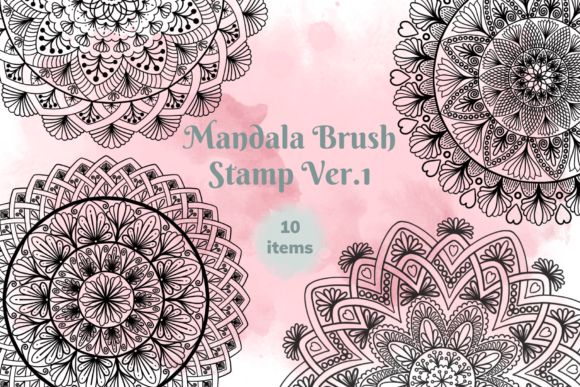
There is a specific moment in every digital creator’s process where the foundational work is done, but the piece lacks soul. You have laid out your bullet journal spread, drafted the layout for a social media graphic, or sketched the outline for a product design, but it feels static. This is usually where the tedious work begins—manually drawing intricate geometric patterns or searching through generic asset libraries for something that fits. However, Mandala Brush Stamp Ver. 1 offers a different path. It provides a set of ten distinct, high-resolution brushes designed specifically for the Procreate app, turning the complex art of mandala creation into a single-tap action.
Unlike standard digital brushes that require you to draw a line from point A to point B, these are stamp brushes. You simply select the brush, choose your color, and tap the canvas. The result is an intricate, symmetrical mandala design that adds immediate depth and spiritual resonance to your artwork. For professionals and hobbyists alike, this set is less about replacing skill and more about optimizing time. It bridges the gap between a rough idea and a polished piece, allowing you to focus on composition and color theory rather than the mechanics of drawing perfect symmetry.
The Visual Language of Symmetry
Mandala art has long been associated with balance, the universe, and meditative focus. In the context of modern design assets, however, mandalas serve a distinct functional purpose: they act as powerful focal points. Mandala Brush Stamp Ver. 1 captures this essence perfectly. The visual style of these ten stamps ranges from simple geometric repetitions to more complex, floral-inspired layers. They possess a personality that is both ancient and adaptable, capable of looking bohemian and earthy in one context, or sleek and futuristic in another, depending entirely on the color palette you apply.
When you drop one of these stamps onto a canvas, you are introducing a high-contrast element that commands attention. This is particularly useful in editorial design or packaging design, where you need a visual hook that doesn't rely on heavy text. The appeal of this brush set lies in its versatility. It doesn't lock you into a specific aesthetic; rather, it provides a structural skeleton that you can flesh out with your own brand identity colors and textures. Whether you are designing a logo for a yoga studio, creating a backdrop for a podcast cover, or adding flair to a digital planner, the visual weight of a mandala provides an instant sense of completeness.
Practical Applications for Digital Entrepreneurs
For the small business owner or content creator, time is a finite resource. The primary value of Mandala Brush Stamp Ver. 1 is the sheer efficiency it brings to production lines. Consider the needs of a digital sticker creator. Instead of drawing individual mandalas for a set of GoodNotes stickers, you can rapidly stamp variations, change colors, and resize them to fit different sticker dimensions. This allows you to scale your inventory quickly without sacrificing the "hand-drawn" quality that customers love.
Similarly, if you are managing a brand’s social media graphics, consistency is key. You can use these stamps to create a recurring visual motif across your Instagram grid or Pinterest pins. By using the same mandala stamp but altering the opacity or layering it with different textures, you create a cohesive visual language that strengthens brand recognition. It works exceptionally well for:
- Digital Planners: Using the stamps as decorative dividers or section headers.
- Mug and Shirt Designs: Creating central focal points for print-on-demand products.
- Web Design: Creating background patterns or hero image accents.
- Bullet Journals: Adding intricate headers to weekly spreads.
The set also comes with a bonus of 30 color swatches. While you are free to use any color you wish, having a pre-selected palette helps jumpstart the creative process, ensuring that the colors harmonize well with the intricate details of the stamp designs.
Design Strategy: Hierarchy and Pairing
Using a premium font or stamp set effectively requires an understanding of visual hierarchy. A mandala is a dominant visual element. If you place a large, opaque mandala stamp next to a delicate script font or a thin sans serif font, the text might get lost. The key to professional integration is balance.
When incorporating Mandala Brush Stamp Ver. 1 into your typography layouts, treat the stamp as a texture or a background element rather than the main character, unless it is a standalone art print. For example, if you are designing a wedding invitation, you might stamp the mandala at a lower opacity to create a watermark effect behind your serif body text. This adds a layer of sophistication and luxury without compromising readability.
Alternatively, you can use the stamps as containers. In logo design or badge creation, placing text inside a mandala can unify the elements. However, be mindful of the "negative space" within the brush stamp. The best results often come from resizing the stamp to fit the text, rather than trying to force the text into a rigid space. Experiment with "clipping masks" in Procreate to confine your text or textures strictly within the mandala lines for a clean, professional finish.
Technical Workflow and Compatibility
It is crucial to understand the technical ecosystem of this asset. Mandala Brush Stamp Ver. 1 is engineered exclusively for the Procreate App Version 5.0 and higher. These are not standard image files; they are code-based brush files optimized for the Apple Pencil’s pressure sensitivity and the Procreate engine. Consequently, these brushes DO NOT work in Photoshop or other applications like Illustrator or Affinity Designer.
For the user, this specificity is actually a benefit. It means the brushes are lightweight and optimized for iPad performance, ensuring that your canvas doesn't lag even when working at high DPI settings for print. The workflow is intuitive: once you download the .brushset file, it imports directly into your Procreate brush library. You select the brush, adjust your brush size slider for the desired scale, and tap. Because they function as stamps, there is no lag or "rendering" time associated with complex vector paths.
Evaluating Fit for Your Projects
As with any design asset, the decision to integrate Mandala Brush Stamp Ver. 1 should be based on the specific needs of your project. This set is ideal if your brand aesthetic leans towards bohemian, spiritual, intricate, or ornate styles. It is equally effective in modern minimalist designs if used sparingly as a high-contrast accent.
However, if your project requires strict geometric precision that cannot be scaled or rotated (though these stamps can be resized freely), or if you are working in a vector-based environment like Adobe Illustrator, this specific raster-based set would not be the right tool. For the Procreate user, though, this represents a significant upgrade to their toolkit. It removes the technical barrier to creating complex art, allowing you to focus on the message and the emotion of your design. Whether you are a crafter making personalized gifts or a marketer building a campaign, these stamps provide a reliable, professional shortcut to beautiful, symmetrical art.